Icon Golf Cart Charger: OEM vs Aftermarket 2026 Guide
Your Icon golf cart came with a charger. At some point, that charger stops working, goes missing, or you realize the one you have is not right for the battery chemistry you just upgraded to. That is when the confusion starts.
The term “Icon golf cart battery charger” can mean a few different things depending on who is asking. Some people are looking for an OEM replacement for their i40 or i60. Others just want an affordable third-party charger that will not fry their AGM or lithium pack. And some are replacing a damaged power cord or receptacle on an otherwise working unit.
This guide covers all of it. We will look at what Icon carts actually use from the factory, what to check before you buy any replacement charger, and which aftermarket options are worth considering. We will also walk through installation basics, common problems, and how to keep your charger and pack alive longer.
Quick Summary
Icon EV carts are 48V systems. The OEM charger is an onboard unit (model HM4820L or similar) that mounts inside the cart and charges via a 120V wall outlet. Most models run on 48V / 20A output and fit i20 through i80 series. If you need a replacement, confirm your battery chemistry first (flooded lead-acid, AGM, or lithium/LiFePO4) since the charger profile differs by type. Third-party options from brands like FORM Charge are widely available on Amazon and work well when spec-matched correctly.
What Charger Does an Icon Golf Cart Actually Use?
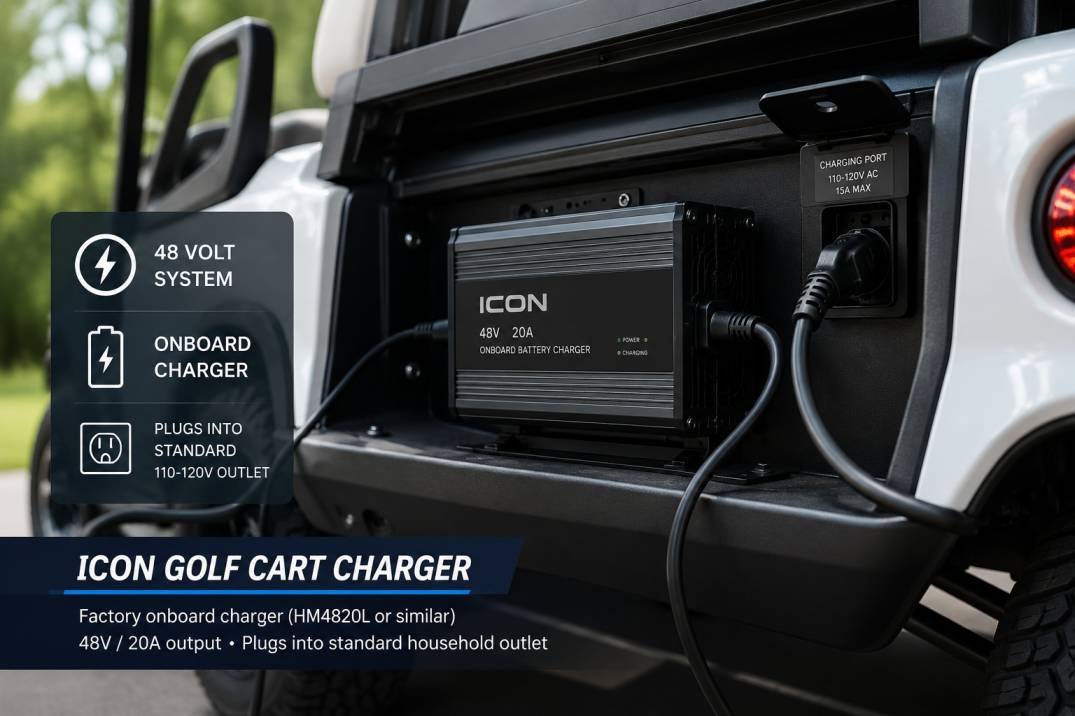
Icon EV golf carts are 48-volt electric vehicles. The factory charger is an onboard unit, meaning it lives inside the cart rather than being a standalone plug-in box. It connects to a standard 110-120V household outlet via a power cord and charges the pack automatically.
The most commonly referenced OEM part number is the HM4820L, a 48V 20A 1,200W onboard charger. It fits the full Icon EV lineup: i20, i20U, i20L, i40, i40F, i40L, i60, i60F, i60L, and i80. More recent models with Eco Battery lithium packs use a different programmable unit with Bluetooth connectivity, which tracks and adjusts the charge profile to match the lithium chemistry.
Icon officially recommends using only the charger bundled with the cart. According to their FAQ, using a third-party charger or battery tender with the Eco Battery lithium system can damage the battery and void the warranty. For lead-acid and AGM setups, the guidance is looser, but matching voltage and chemistry still matters.
Before buying anything, find the label on your current charger or check your cart manual for the battery type. This one step saves most of the frustration people run into.
Icon Golf Cart Battery Types and Why It Changes Everything
Icon has used three battery chemistries across different model years and trim levels. Knowing which one is in your cart determines what charger you need, full stop.
| Battery Type | When Used | Charger Profile Needed | OEM Warranty Impact |
|---|---|---|---|
| Flooded Lead-Acid (FLA) | Early Icon models, pre-2022 | Standard 48V lead-acid profile; needs controlled bulk/absorption/float stages | Replaceable with compatible aftermarket |
| AGM (Absorbed Glass Mat) | Mid-range models, some current trim levels | AGM-specific voltage curve; do NOT use a standard FLA charger | 2-year battery warranty per Icon |
| Lithium / LiFePO4 (Eco Battery) | 2022+ models, all current Icon EV lineup | LiFePO4-specific profile with BMS communication; 58.4V output at full charge | Third-party charger voids Eco Battery warranty (8-10 years) |
If you have a 2022 or newer Icon EV with the Eco Battery lithium pack, the warranty situation is real. Icon specifies the Eco Battery charger by design, and using a generic unit can void an 8-to-10-year battery warranty. For older lead-acid setups, third-party chargers are a reasonable option as long as the voltage, chemistry, and connector match up.
Not sure what battery your cart has? Check the sticker on the battery itself. Lead-acid cells will typically say “6V” or “8V” per cell. An Eco Battery pack will be labeled as such and the cart manual will confirm. If in doubt, call your local Icon dealer with your serial number.
OEM Charger vs. Aftermarket: Which Should You Buy?
This is the question most people land on, and the honest answer depends on your situation.
Get the OEM or authorized replacement if: your cart has the Eco Battery lithium pack and is under warranty. Wild About Carts is the only authorized online ICON parts retailer and sells the Bluetooth-programmable OEM replacement charger. Revenge Golf Cart Parts also carries it. Paying more to protect an 8-year battery warranty is worth it.
An aftermarket charger works fine if: your cart has flooded lead-acid or AGM batteries, your cart is out of warranty, or you are upgrading to a lithium kit and buying a third-party charger as part of that conversion. Just match the specs carefully and avoid the cheapest no-name options without any safety certifications.
Recommended Charger for Icon Golf Carts
Below is the aftermarket option we recommend for Icon owners with lead-acid, AGM, or lithium battery setups.
FORM 48 Volt Golf Cart Battery Charger for ICON Golf Carts

48V / 15A | Lead Acid, AGM, LiFePO4 | WeatherShield Waterproof (IP67) | 24-Month Warranty
This is a direct-fit onboard replacement for Icon carts running 48V systems. FORM built it with Icon’s mounting points and connector in mind, so it drops in without modification. It handles Lead-Acid, AGM, and LiFePO4 chemistry in one unit, which matters if you are planning to convert to lithium later. The Force Mode feature can recover over-discharged batteries that a standard charger would reject. It also transitions to a maintenance mode automatically when the pack reaches full charge, so leaving it plugged in overnight is not a problem.
The WeatherShield internal coating with IP67 rating is worth calling out since onboard chargers take a beating from moisture, vibration, and road debris. FORM backs it with a 24-month warranty and U.S.-based support, which is more than most of the generic Amazon listings offer.
- Output: 48V / 15A
- Compatible with: Icon i20, i20U, i20L, i40, i40F, i40L, i60, i60F, i60L, i80
- Battery types: Flooded Lead-Acid, AGM, Lithium LiFePO4
- Features: Force Mode, automatic maintenance mode, waterproof coating
- Warranty: 24 months, U.S. support
One thing to note: FORM makes separate SKUs for lead-acid and lithium packs on some of their other models. The Icon-specific listing above covers both in one unit, but always double-check the product title before you buy, especially if you are shopping other brands.
Icon Charger Specifications at a Glance
The original OEM onboard charger (HM4820L) and most quality aftermarket replacements share a similar spec range. Here is what you are working with:
| Specification | OEM (HM4820L) | Aftermarket (e.g., FORM) |
|---|---|---|
| Output Voltage | 48V DC | 48V DC (58.4V output for LiFePO4 models) |
| Max Output Current | 20A | 15A (most common) or 20A |
| Input Voltage | 110V AC (standard US outlet) | 85-264V AC (wide range) |
| Efficiency | ~90%+ | 93%+ on quality units |
| Typical Charge Time (105Ah pack) | ~6-8 hours (from 50% discharge) | 7-8 hours at 15A; 5-6 hours at 20A |
| Charger Type | Onboard (mounted inside cart) | Onboard or portable |
| Chemistry Support | FLA or AGM (older); LiFePO4 (newer Eco Battery version) | Varies by model; check label carefully |
Charging time follows a simple formula: Hours = Ah ÷ Amps. A 105Ah pack on a 15A charger would need about 7 hours from fully depleted, not counting efficiency losses. In practice, add 10-15% to that estimate for a more realistic figure. For a deeper look at how long the process takes, see our guide on how long it takes to charge golf cart batteries.
How to Charge Your Icon Golf Cart: Step-by-Step
The process is simple but a few details matter, especially for new batteries going through their break-in period.
Step 1: Position the cart near a standard 110V outlet. Icon recommends a dedicated circuit to avoid issues with shared loads. Avoid GFCI outlets if possible, as these can trip during normal charger operation. Do not use extension cords if you can help it, and if you must, use at least 10 AWG for runs longer than 15 feet.
Step 2: Turn the key OFF. Charging with the key in the on position adds load variability and can interfere with the charge cycle on some controllers.
Step 3: Plug the charger into the wall outlet first, then into the cart’s charge port. This prevents arcing at the cart-side connector.
Step 4: Let the charger run to completion. Do not interrupt the cycle. Icon specifically says to allow the charger to shut off on its own, especially for new lead-acid batteries during their break-in period. Cutting a charge short early on can reduce long-term capacity.
Step 5: Once the indicator turns green or the charger shuts off automatically, unplug from the cart first, then from the wall. On the Eco Battery lithium system, you can safely leave it plugged in long-term since the charger auto-stops and maintains charge. For lead-acid, avoid leaving it connected beyond 30 days without checking.
If you have a brand new Icon with lead-acid batteries, the first 10 to 20 cycles are critical. The factory recommends fully charging before first use, then driving to about 75% discharge and repeating. By the 12th cycle, performance improves noticeably. For more detail on the first-charge process, read our guide on charging a golf cart battery for the first time.
How Often Should You Charge an Icon Golf Cart?
For lead-acid batteries, the general rule is to charge after every use, even if you only drove for an hour. Lead-acid packs lose life when left in a partially discharged state. Sulfation, the gradual crystallization of lead sulfate on the plates, starts within hours of discharge and gets worse the longer you wait.
For Icon’s Eco Battery lithium packs, the chemistry is more forgiving. You do not need to charge after every short ride, and the pack handles partial charges without degrading. That said, getting into a routine of plugging in at the end of each day makes sense and adds no wear to a lithium pack.
Overnight charging is safe on either chemistry when using a charger with auto-shutoff. If you want a deeper dive on that topic, our overnight charging guide covers the safest approach in detail.
Troubleshooting Common Icon Charger Problems
Before assuming the charger is dead, run through these checks in order. Most issues come down to power supply, connection quality, or temperature rather than a failed unit.
| Problem | Most Likely Cause | What to Do |
|---|---|---|
| Charger does not power on | Tripped GFCI, blown fuse, or dead outlet | Try a known-good outlet on a different circuit; reset any GFCI or breaker; inspect power cord for heat damage |
| Charger starts then stops within minutes | Battery deeply discharged below charger recovery threshold | Use a charger with a Force Mode or recovery feature to wake the pack; check individual cell voltages with a multimeter |
| Charging takes much longer than expected | Battery temperature too cold, corroded terminals, or weak cell in pack | Move to a warmer space; clean terminals with a wire brush; check individual battery voltages |
| Charger runs hot to the touch | Blocked ventilation or ambient temperature too high | Ensure airflow around the unit; charge in shade; if the cart body is trapping heat, consider a ventilation gap |
| Steady red indicator light | Fault or interlock not engaged | Unplug, inspect and reseat all connectors, then try again |
| Flashing amber indicator | Charge paused due to temperature protection | Move the cart to a cooler, ventilated area and retry |
| Steady green indicator | Charge complete | Unplug and check battery SOC; turn key on and gauge should read 100% |
Icon’s FAQ notes a specific quirk: after charging, unplug the cart and turn the key to ON. The gauge should then show 100%. If it does not, or if the issue keeps recurring, contact your local authorized Icon dealer. If you want to verify the charger itself is working properly, our charger testing guide walks through how to check it with a multimeter.
Can You Overcharge an Icon Golf Cart Battery?
This comes up a lot, and the short answer is: yes, with the wrong charger. A charger without automatic shutoff or a smart charging profile can continue pushing current into a full pack, which causes heat buildup, electrolyte loss in lead-acid batteries, and shortened lifespan across all chemistries.
The OEM Icon charger and quality aftermarket units handle this automatically. They detect when the pack is full and drop to a maintenance or float mode. The Eco Battery lithium charger communicates with the BMS directly, so overcharge protection is built into the loop.
Where overcharging becomes a real problem is with mismatched chargers, particularly using a lithium charger on a lead-acid pack or vice versa. The voltage profiles differ, and neither type of battery responds well to the wrong curve.
Swollen battery cases, a sulfur smell, or excessive heat during a normal charge cycle are warning signs of an overcharge condition. Stop immediately, disconnect, and do not attempt to recharge a swollen pack. Follow local battery disposal guidelines.
Safety Guidelines for Charging Your Icon Cart
These are not just boilerplate reminders. A few specific situations trip up Icon owners more than others.
| Situation | What to Know |
|---|---|
| Charging in cold weather | Below 32°F, the Eco Battery BMS pauses charging. Icon notes this can also affect the cart’s regenerative braking system. Wait until the temperature rises before plugging in. |
| Charging in extreme heat | The Eco Battery lithium pack has been tested up to 115°F ambient. Lead-acid packs are more vulnerable to heat. Never charge under direct sun or in an enclosed hot garage without ventilation. |
| Damaged connectors or ports | Do not force a charger plug into a port that is corroded, wet, or deformed. Inspect the receptacle head and replace if needed before plugging in. |
| Extension cord use | Icon advises against extension cords. If necessary, use only 10-12 AWG rated for runs under 25 feet. Thinner wire creates voltage drop and heat. |
| Surface under the charger | Do not charge on carpet, wood, or other insulating surfaces that trap heat under the unit. Use a hard, flat, non-flammable surface. |
Maintenance Tips to Keep Your Charger and Batteries Lasting
Most charger problems are preventable. A few minutes of periodic inspection saves a lot of money on replacements.
Monthly: Inspect the power cord and connector for cracks, corrosion, or heat discoloration. Wipe down connectors with a dry cloth. Check for visible rust or green oxidation on battery terminals and clean with a wire brush or a bit of isopropyl alcohol if found.
Quarterly: Use a multimeter to verify the charger output voltage matches what the label says. A charger that reads 4-5 volts under rated output is either failing or there is a wiring issue. Check individual battery voltages across the pack to spot any weak cell before it brings the whole system down.
Semi-annually: Clear any dust from the ventilation slots on the charger. This is especially worth doing if the cart is stored in a garage with airborne debris. A clogged charger runs hotter and thermal-throttles, which slows charging and shortens the unit’s life.
Long-term storage: For lead-acid packs sitting unused, FORM recommends checking the charger at least every 30 days. To store properly, fill lead-acid batteries with distilled water, switch the cart to tow mode, and disconnect the main battery cables. For lithium, the charger can remain connected since auto-stop handles it, but Icon recommends periodic checks to confirm no damage or leakage.
Keep a simple log of charge times and any unusual behavior. An unexplained increase in charge duration (e.g., packs that used to charge in 6 hours now taking 9) usually points to a weak battery cell rather than a charger problem.
Frequently Asked Questions
What voltage is the Icon golf cart charger?
All current Icon EV golf cart models run on 48V battery systems, so the charger output is 48V DC. For lithium (LiFePO4) packs, the charger outputs up to 58.4V during bulk charging, which is the correct top-of-charge voltage for a 48V lithium pack. The wall input is standard 110-120V AC.
Which Icon golf cart models does the OEM charger fit?
The OEM onboard charger and most quality aftermarket replacements fit: i20, i20U, i20L, i40, i40F, i40L, i60, i60F, i60L, and i80. Always confirm the connector type matches your cart’s charge port before ordering.
Can I use a third-party charger on my Icon EV with the Eco Battery?
Technically yes, but Icon explicitly warns against it. Using a third-party charger or battery tender with the Eco Battery lithium system can damage the battery and void your warranty. If your Eco Battery is within its 8-10 year warranty window, stick with the OEM charger.
How long does it take to fully charge an Icon golf cart?
For most setups, count on 6 to 8 hours from a half-depleted pack. A deeply discharged 105Ah lead-acid pack on a 15A charger can take closer to 10-12 hours. Icon’s lithium Eco Battery packs charge faster, commonly in 5-6 hours, thanks to the higher-current charger that ships with them.
What should I do if the charger is not turning on at all?
Start with the basics: test the outlet with another device to confirm it is live. Reset any GFCI or breaker on that circuit. Inspect the power cord for heat damage or cracks. Check that the cart-side connector is fully seated and free of corrosion. If all of that checks out and the unit still does not power on, the charger likely needs replacement.
Is it safe to leave my Icon golf cart plugged in overnight?
Yes, when using a smart charger with automatic shutoff. Both the OEM Icon charger and quality aftermarket units like the FORM detect a full charge and stop automatically. The Eco Battery lithium charger can be left connected indefinitely. For lead-acid, avoid leaving it beyond 30 days during storage without checking the pack condition.
Should I charge my Icon golf cart after every ride?
For lead-acid batteries, yes. Leaving them partially discharged accelerates sulfation and shortens pack life. For lithium, it is less critical, but plugging in regularly is a good habit with no downside. Read our full breakdown on whether you should charge after every use for more detail on both chemistries.